Dallas Weather Observation Field
About the Dallas Weather Observation Field
The Dallas Weather Observation Field (station KDWO) is a personal weather station in Dallas, Texas. It measures the weather every minute and shares it live on this website, the KDWO phone line and KDWO Weather Radio. KDWO also runs its own forecast office and sends local weather alerts for the Dallas area.
Our mission
Give Dallas neighbors accurate, hyper-local weather they can check in seconds, explain what's coming in plain language, and help people get to safety faster when storms hit North Texas.
What "KDWO" means
Weather stations are known by short call signs. Airports in the U.S. start with K (Love Field is KDAL), so the station follows the same style: K + Dallas Weather Observation. KDWO is not an airport or government station. It's an independent, personally run weather station.
Have a question? See Questions & Answers.
What KDWO Does
How the Data Flows
- Sensors measure. The outdoor sensors send readings by radio to an Ecowitt gateway inside.
- The station computer records. WeeWX saves every reading to the KDWO database and checks it for problems.
- Everything updates. The website, graphs, phone line, weather radio and app pull from the same live data, so they always match.
- The data is shared. Every 10 minutes KDWO uploads its observations to the Citizen Weather Observer Program (CWOP), which feeds NOAA's MADIS system.
Update schedule
| What | How often |
|---|---|
| Live conditions | every minute |
| Webcam image | about every 30 seconds |
| Database record + graphs | every 5 minutes |
| Upload to CWOP / NOAA MADIS | every 10 minutes |
| KDWO forecast | every 3 hours (sooner if the forecaster updates it) |
| Sky timelapse video | every evening after sunset |
| Station self-check | every minute (station status) |
The Sensors
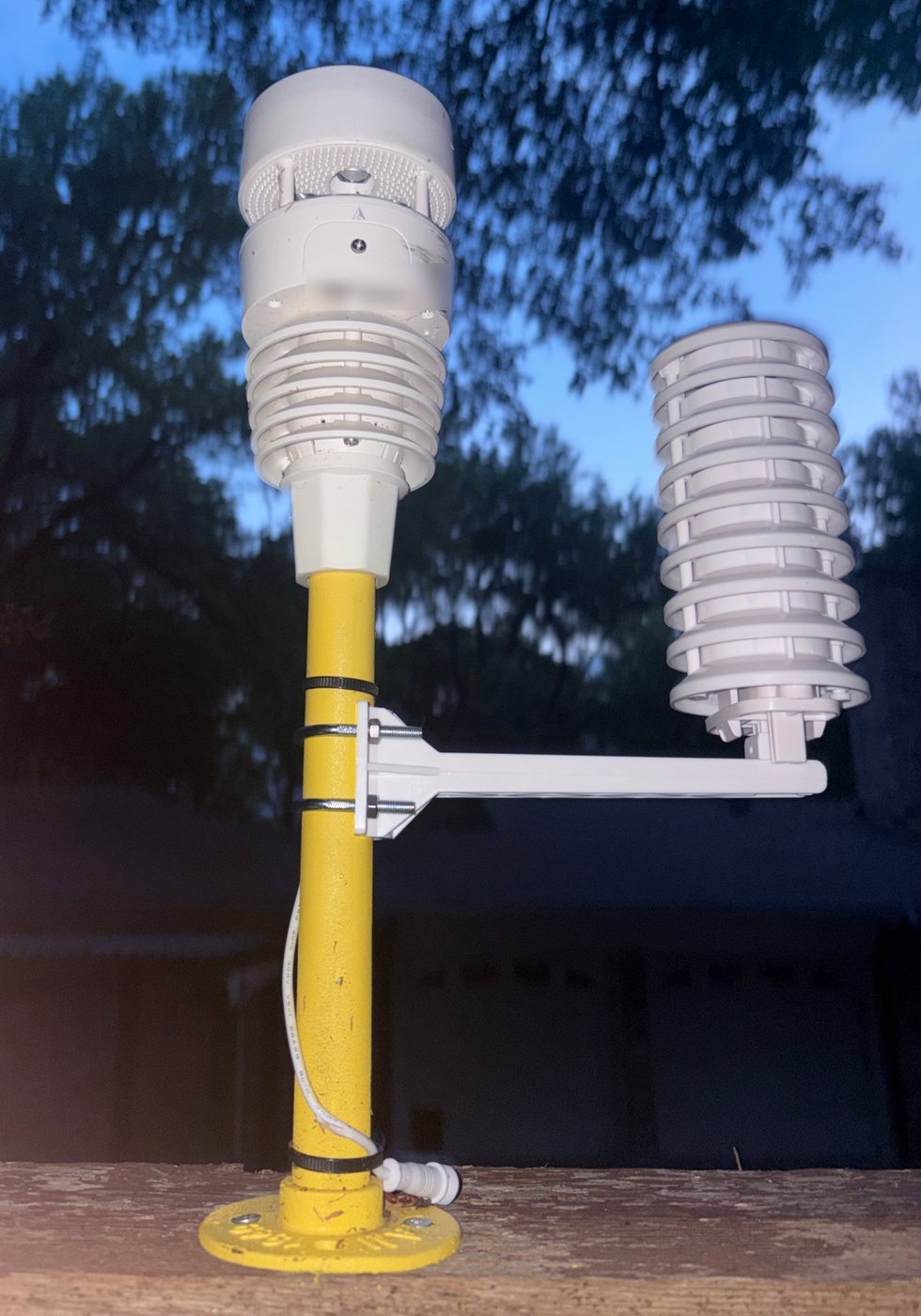
KDWO's outdoor sensors sit on a mounting pole outside the KDWO office, in open air, away from walls and pavement that hold heat, so the readings match the real air around the station.
- Main sensor array (top of the pole)
- Measures wind speed, gusts and direction with ultrasonic sound pulses, so there are no spinning cups to wear out or freeze. The top surface senses rain by the vibration of each drop, and a light sensor reads sunlight and UV.
- Radiation shield (on the side arm)
- The stack of white plates keeps the temperature and humidity sensor in the shade while letting air flow through. Without it, the sun would heat the sensor and readings would run too warm.
- Lightning detector
- An Ecowitt WH57 picks up the radio burst from lightning strikes and estimates how far away they are, out to about 25 miles.
- Webcam
- An Ecowitt Wittcam HP10 watches the sky over the KDWO office all day. Its images make the live webcam and the daily sunrise-to-sunset timelapse.
- Station computer
- Everything feeds a station computer running WeeWX, which saves every reading, builds the records and climate reports, and updates the site every minute.
How KDWO Warnings Work
- The station watches the weather. KDWO's sensors, the lightning detector, radar and National Weather Service warnings are checked around the clock.
- An alert is issued. Some alerts are sent by the station operator when a storm is coming. Others fire automatically when the station measures something dangerous (see the table below).
- It goes out everywhere at once. The alert shows up on every KDWO channel within seconds.
- An all clear ends it. When the danger passes, KDWO sends an all clear so you know it's over.
Automatic alerts from the station
| When KDWO measures… | It sends |
|---|---|
| Temperature below 32°F | Winter weather alert |
| Heat index above 105°F | Extreme heat alert |
| Wind gust above 50 mph | High wind alert |
| Rain falling faster than 2 in/hour | Street flooding alert |
| Lightning within 10 miles | Lightning alert (the operator approves it first) |
Each automatic alert sends once per event and won't repeat until conditions ease, so you aren't flooded with notifications.
Where alerts reach you
Colors
Alerts use the same colors as the National Weather Service map, so red always means tornado, orange means severe thunderstorm, and so on.
KDWO alerts are unofficial. They add local detail but never replace the National Weather Service. Always follow official warnings, and call 911 in an emergency.
Accuracy & Limits
KDWO's sensors are good consumer-grade instruments, sited in open air and shaded from the sun. Readings are checked against nearby stations like Love Field (KDAL) and the CWOP data quality report.
- Your street may differ. Dallas weather changes block to block. Storms can drop rain on one neighborhood and miss the next, and pavement makes some areas run warmer.
- Rain in strong wind. Any rain gauge can read a little low in heavy wind-driven rain.
- Lightning distance is an estimate. The detector is good at telling near from far, but the miles are approximate.
- Outages happen. Power or internet loss can pause the station. Gaps show up on the status page and in the graphs.
Station Timeline
| When | Milestone |
|---|---|
| December 2025 | Registered with CWOP as GW6844, sharing data with NOAA MADIS |
| October 2026 | KDWO Forecast Office, interactive radar, graphs and station status page |
More Station Photos
Station Equipment
| Sensor array | Ecowitt outdoor sensors |
| Lightning | Ecowitt WH57 |
| Webcam | Ecowitt Wittcam HP10 |
| Gateway | Ecowitt Wi-Fi gateway |
| Software | WeeWX |
| Updates | every minute |
Station
| Station ID | KDWO |
| Type | Personal weather station |
| Location | Dallas, Texas |
| CWOP ID | GW6844 |
| Days of data | -- |
| Operated by | @bruce_stormchaser |
The map pin on this site is placed near the station, not at its exact spot, for privacy.
Get KDWO Alerts
Data Sharing
GW6844 on findU (CWOP) »
CWOP data quality report »